Blog

Multi-Page SEO Technique

NOTE FROM EDITOR [Joe]: The following guest post is by the amazing Mr. Ammon Johns. It was first published in 2011 on his own site. However because, Ammon, is some kind of weirdo, he deleted it quite some time ago. BUT, he has given me permission to republish here in it’s entirety! Personally, this post changed the way I thought about information architecture and internal linking. It beautifully articulates how to increase customer/user experience, and apply an aggressive approach to SEO at the same time. Win/Win!

This is the long-awaited update to my classic 3-page search engine optimization technique, which was first published in 2003.  This is a rare example of a specific SEO technique that has been used successfully for many years.

It can be openly shared in this way because it is a technique that also enhances usability, and is not in itself in any way ‘shadey’ or deceptive to search engines. Continue reading →

Content Marketing Isn’t Always Good For SEO

spilledA few years ago I remember talking with a new client over the phone as they described all of the work former SEO agencies had done for them in the past. If you do a lot of client work in SEO, you are more than likely going to meet clients that have wasted tons of money in the past on bad SEO. This particular client though was a little different. This company had hired a well known SEO agency that specializes in content marketing. As a result they had published several very successful infographics and other popular pieces of content. Because of this they had acquired a very nice back link profile and popular social media accounts. Continue reading →

In 2015, Your Job As An SEO Should Be Just SEO (or Why Erin Everhart Is Wrong)

I will admit that I don’t know Erin Everhart extremely well. I sat beside her once at #EpicDinner and she seemed then super duper cool. She probably is still really cool, but unfortunately shes written a piece at SEL that has me a bit unnerved.

To sum up Erin’s post: SEO has changed so much that the role of an SEO now encompasses lots of things that haven’t been normally associated with SEO. The things that Erin list in her article are: Content Developer, UX Advocate, Digital Strategists, Creative Marketer. and Cheerleader.

To Erin’s credit, shes not 100% wrong. Because the reality is that, if executed correctly, all of the things that she mentions DO help with SEO. The problem however, is that too many people that don’t really understand SEO, are reading Erin’s article (and the 100s of others with the same message) and making the assumption that SEO is now just good marketing…. that SEO is now dead.

We hear it every couple of years, someone says that SEO is silly or dead because, what they understand SEO to be is just other forms of online marketing packaged with a trendy catch phrase. This is not only wrong, but very dangerous.

And yes I said dangerous….

Case Study #1: I once had a large eCommerce client who changed the URL structure of their site with out consulting a SEO first. As a result they lost tons of organic traffic from Google which equaled a loss of $7 million each month. I worked with them to develop a redirection strategy and implement it. As a result the client regained rankings, traffic, and revenue.

Case Study #2: I once had a small business client who lost around $500k in one month because of a rankings shift. They had to lay people off…. it was horrible. In around 3 months I was able to get them back to where they were before, and help them regain the revenue. They now rank #1 for the term in question and have also taken over several other niches.

Case Study #3: One time an eCommerce client decided they wanted a new “hip” web site. They spent thousands of dollars on a new design that used AJAX for everything. And when I say everything, I mean there were no URLs!! Every time you clicked a link anywhere on the site it would make a unique AJAX call, and load the content on top of the same HTML scaffolding. No title tags, no unique pages, nothing. This was a site that had a few thousand pages indexed. They called me in to give the design a “quick look” a few days before launch.

Case Study #4: I once had an eCommerce client that had lots of competitors, however he was the only one that actually manufactured what he sold. Because of that I started looking at his niche’s wholesale market and discovered that there was no one competing in that space. We setup a small SEO campaign around wholesale supplying and his business grew 400%.

Case Study #5: I honestly can’t even count how many clients I have worked with that have gotten hit by Panda/Penguin or manual penalty because they didn’t hire an SEO before making a change to their business/web site. This problem is so pervasive that some really smart SEOs have become specialist in helping businesses clean up their past mistakes.

All of the issues listed above were fixed by a SEO, not a: content developer, UX advocate, digital strategists, creative marketer. or cheerleader. All of those roles are very important to the SEO process, but they aren’t any more or less important than other things that we might find in a comprehensive marketing strategy.

And because all of the things that Erin mentioned in her article are important to SEO and marketing; SEOs should be working closely with folks that excel at those things, not trying to master them. One reason that SEO has a bad name is because too many SEOs try to do everything when they probably suck at some of those things. But it’s okay to suck at some things, because look at the amazing things (above) a SEO can do with out doing any of the things that Erin listed.

If you want to be a better SEO in 2015, then its time you start working along side other marketing professionals that truly excel at their jobs. In the end you will have more time to handle the things that only a SEO can, and will end up getting better results for your clients.

How To Switch To HTTPS URLs For Optimal SEO

padlock

Editors note (7/29/2015): In this post the term “Webmasters Tools” is used to describe what Google now calls the “Search Console”. While the name of the interface has changed, the functioning hasn’t. 

Last week Google announced that the use of HTTPS or SSL security certificates will be added to their long list of ranking factors. How much influence will using SSL certificates have on rankings? Who knows. But because Google has formally stated that this is in fact a ranking factor, it now should be considered an important step in improving rankings and traffic. However, in order to implement this change for existing web sites, webmasters will need to change the fundamental URL structure. This in itself can be a dangerous procedure when it comes to SEO. If URLs are not redirected correctly they can be come de-indexed, or negative signals can be created.

Therefore, in this post I will go through the steps required to successfully redirect all of a domain’s URLs to HTTPS. However, before we begin you should understand that this guide is only intended for web sites hosted on Apache servers. Also if you are already working with an SEO or have a web developer, you should consult with them prior to making the changes suggested in this article. Every site is unique and what I mention in this article may not be the best course of action for everyone.

Contents:

  1. Buy a SSL Certificate
  2. Edit HTACCESS For 301 Redirection
  3. Edit WordPress Or Other CMS Settings
  4. Add HTTPS To Webmaster Tools
  5. Add HTTPS To Google Analytics

1) Buy a SSL Certificate

A SSL certificate is needed to verify the authenticity of the secure connection. You can purchase one from most domain registers or your hosting company. I would recommend using your hosting company because they are likely able to help install it for free.

2) Edit HTACCESS For 301 Redirection

If you aren’t familiar with editing htaccess files, then you probably shouldn’t do it. Every htaccess file is unique and adding something in the wrong location can shut down an entire web server very quickly. therefore if you are not comfortable with this section then you should probably hire a web developer to do this part for you. Or you can always use a plugin or GUI provided by your hosting company to manage this file. Either way, proceed with caution.

Essentially what we need to do with this first step is to tell the web server that we would like any request that does not include a “https” at the beginning to be redirected via a 301 http status code to the corresponding URL that does have a https at the beginning. Because this redirection command will be “domain wide” and not based on individual URLs, we can use a simple regular expression to make these redirections all at once.

RewriteEngine On
RewriteCond %{SERVER_PORT} 80
RewriteRule ^(.*)$ https://www.example.com/$1 [R=301,L]

As you can see on line 3 of the above code, the regular expression is relatively simple. However, it is very important that you adhere to your preferred domain structure. This mostly means that if your current URLs contain a “www” at the beginning, then it should also contain it in this directive. If your current URLs do not contain a “www”, then the domain in the above directive should not either.

3) Edit WordPress Or Other CMS Settings

If you finished the last step successfully then all of the non-https URLs should be redirecting correctly. This is awesome! 🙂 However, now you should make sure that existing internal links, and future internal links are pointing towards the https version of the site. This might seem like a low priority now that the URLs are redirecting anyways, but historically the SEO community has believed that the least amount of internal redirects is better. This is especially true if you have a large site that includes the same internal links on every page (like a main menu).

In WordPress this task is simple. All you have to do is login to your WordPress admin interface and visit the general settings panel at: /wp-admin/options-general.php Once at the right page edit the “WordPress Address” and “Site Address” fields to include “https” at the beginning.

WPsettings

Other content management systems should have similar settings pages that should allow you to make the same changes.

4) Add HTTPS To Webmaster Tools

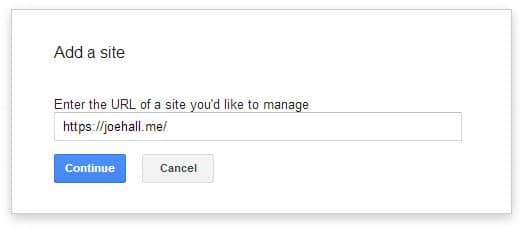
addwmt

You should already have your site integrated into Webmaster Tools. However, now you will need to also add the https version as well. To do this, you will need to add the site as if it were a new site.

Like all new sites you will need to verify the https version as well. After you have added the https version successfully, you should keep the Webmasters Tools account for the non-https version in place to monitor how Google is handling the redirects and the future indexation of the site.

5) Add HTTPS To Google Analytics

Unlike Webmaster Tools, you shouldn’t need to setup a new profile for https. Instead login to your existing account and go the “Profile Settings” under the Admin link at the top menu. On this page you should see a bunch of settings that are unique to the domain. You can select the https version from the drop down box like so:

defaultsettings

After selecting https from this drop down menu, you can save the settings.

Monitor Closely

At this point you are finished. However you should continue to monitor Webmaster Tools and Google Analytics on a regular basis to verify that you aren’t loosing traffic or rankings.