Link equity remains one of the most foundational concepts in SEO, yet it’s also one of the most misunderstood. In simple terms, link equity is the value or authority that flows from one page to another through hyperlinks. This “value” helps search engines evaluate which pages are more authoritative, more relevant, and ultimately more deserving of higher rankings.
In my recent video, I walked through what link equity really means, why it matters, and how SEOs and site owners can use it strategically. This article expands on that discussion, providing a clear breakdown of how link equity works and how you can use it to strengthen your website’s overall visibility.
What Is Link Equity?
Link equity refers to the ranking value that a page passes to other pages through hyperlinks. When one page links to another, some percentage of its authority flows through that link. Think of it like water flowing through pipes: each link is a channel that distributes value.
Several factors influence how much equity a link passes, including:
The authority of the linking page
The relevance between the linking and linked pages
The number of links on the linking page
Whether the link is internal or external
Whether the link is followed or nofollowed
Links from authoritative, well-trusted pages pass more value than links from lower-quality pages but all followed links have the potential to carry some amount of equity.
Why Link Equity Matters for SEO
Search engines rely on link patterns to understand which content deserves to rank. When a highly authoritative page links to another page, it acts like a vote of confidence. Multiply that across dozens or hundreds of links, and the result is a powerful ranking signal.
But link equity doesn’t just matter for backlinks. Internal links the links within your own site determine how equity circulates across your content. If Google sees a strong internal linking structure that clearly prioritizes your most important pages, those pages are likely to perform better in the search results.
In short:
External links bring authority into your site.
Internal links distribute that authority where it needs to go.
How Link Equity Flows Through a Website
Imagine Page A has significant authority and links to Page B and Page C. Because the link value is divided among outgoing links, each linked page receives a portion of Page A’s equity. If Page B and Page C also link to other pages, the authority continues to flow in a cascading manner throughout the site.
This is an oversimplified version of the original PageRank algorithm but the general idea still applies today.
Some key principles:
1. Each link shares a portion of the page’s authority.
If a page has many links, each one passes less equity. This is why tightly focused internal linking can be more effective than linking excessively or randomly.
2. Links create pathways of significance.
Pages that receive more internal links tend to be perceived as more important. This is one reason category pages, product pages, and pillar content often rank well: they live at the center of many internal pathways.
3. Link equity compounds.
If a page receives external backlinks and then links to other internal pages, it can amplify the authority of your entire site structure.
Practical Ways to Optimize Link Equity
Here are some actionable strategies for making the most of the link equity your site earns:
Audit Your Internal Links
Identify your most authoritative pages often those with the strongest backlink profiles and ensure they link to your highest-priority content.
Reduce Unnecessary Outgoing Links
Too many links dilute equity. Keep your navigation and page templates tight and purposeful.
Use Clear, Descriptive Anchor Text
Anchor text helps search engines understand context. Use it naturally, but be descriptive enough to signal relevance.
Strengthen Key Pages with Supporting Content
Cluster-based architectures (pillar pages linking to topic clusters) help funnel equity into the pages you most want to rank.
Clean Up Orphaned Pages
Pages that receive no internal links receive no internal equity either making them nearly invisible to search engines.
A Simple Way to Visualize Link Equity
In the video, I walked through an example showing how link equity divides when a page includes multiple outbound links. If Page A has three outbound links, each linked page receives roughly one-third of that page’s equity. While modern algorithms are more nuanced, the general principle remains: the more links you have on a page, the less equity each link passes.
This is why both internal and external linking strategies should be intentional rather than accidental.
Link equity is one of those SEO concepts that becomes more intuitive the more you work with it. It influences rankings, shapes site performance, and helps search engines navigate your content. By understanding how authority flows and designing your site architecture around that flow, you can significantly improve both individual page rankings and your site’s overall SEO strength.
If you’re interested in seeing a visual walkthrough, be sure to watch the full video on YouTube, and feel free to reach out with questions or comments.
Modern JavaScript frameworks enable dynamic, fast, and interactive websites, but they also introduce unique SEO challenges. When improperly configured, scripts can prevent crawlers from seeing content, slow down rendering, or cause inconsistent indexing.
This checklist outlines the best practices for optimizing JavaScript for SEO, organized into four sections of best practices. Each best practice includes:
A description – what the practice is and why it matters.
Implementation guidance – how to apply it correctly.
Verification steps – how to confirm proper Quality Assurance (QA) using Chrome Developer Tools and Google Search Console (GSC).
Guide Summary:
This guide provides a complete framework for optimizing JavaScript websites for SEO by ensuring that crawlers can easily access, render, and understand page content. It covers foundational practices like using server-side or static rendering, implementing progressive enhancement, and keeping all critical resources crawlable; reinforces strong indexing signals through stable canonical tags, structured data, and consistent metadata; promotes discoverability with SEO-friendly URLs, accessible navigation, and indexable dynamic content; and concludes with technical performance improvements such as deferring render-blocking scripts, applying code splitting, enabling native lazy loading, leveraging caching, and monitoring Core Web Vitals. Together, these best practices align modern JavaScript development with search engine requirements, creating sites that load faster, rank better, and deliver exceptional user experiences..
Modern search engines can execute JavaScript, but their rendering process adds extra complexity and time. Ensuring your pages are easily crawlable and render correctly helps Googlebot and other crawlers access, understand, and index your content efficiently.
1.1 Use the Right Rendering Method
JavaScript websites can be rendered in multiple ways: Client-Side Rendering (CSR), Server-Side Rendering (SSR), Static Site Generation (SSG), or Dynamic Rendering. CSR relies entirely on the browser to execute JavaScript, meaning the HTML delivered to Googlebot may be nearly empty. SSR, SSG, and dynamic rendering provide a fully or partially pre-rendered HTML response, making it easier for crawlers to index your content correctly
How to implement correct rendering method
Prefer SSR or SSG using frameworks like Next.js, Nuxt.js, or Gatsby. These output static HTML before hydration by client-side JS.
For complex, JavaScript-heavy SPAs that can’t switch frameworks, consider dynamic rendering: serve pre-rendered HTML snapshots to bots and interactive JS to users. Tools like Rendertron, Prerender.io, or Puppeteer can automate this.
Configure your server or CDN to detect crawler user agents and deliver the pre-rendered version.
How to check rendering:
Chrome DevTools:
Open View Page Source and confirm that key HTML elements (title, meta description, headings, body text) are visible before JS executes.
Compare this to the Elements tab (the live DOM). If the DOM adds content not present in the original source, that content depends on JS.
Google Search Console (GSC):
Use URL Inspection → View Crawled Page → HTML tab. Search for key elements or text.
If GSC’s rendered HTML matches your visible page content, rendering is successful.
If not, use Test Live URL to see whether changes in rendering or blocking are preventing full indexation.
1.2 Implement Progressive Enhancement
Progressive enhancement builds the core structure and content in plain HTML, then layers on JavaScript for styling and interactivity. It ensures that users and bots always get the essential content even if scripts fail or take too long to execute.
How to implement progressive enhancement:
Start each page with a static HTML skeleton containing:
<title> and <meta> tags
Headings (<h1>–<h3>) and critical body text
Navigational links (<a href="..." >)
Load enhancement scripts asynchronously so the base content appears immediately.
Avoid inserting critical elements (canonical tags, meta robots, hreflang) through JavaScript; include them in the HTML head from the start.
How to check progressive enhancement:
Chrome DevTools:
Disable JavaScript (Settings → Debugger → Disable JavaScript) and refresh. The page should still display primary content and navigation.
Google Search Console (GSC):
Inspect the URL and verify that the static HTML shows the same core elements visible to users. Missing titles or text indicate the page relies too heavily on client-side rendering.
1.3 Ensure Navigational Elements Exist in Static HTML
Links, menus, and pagination guide both users and search engines. If they’re generated dynamically via JavaScript (e.g., onclick handlers or React routers without proper anchors), crawlers may fail to discover deeper pages
How to ensure navigational elements exist in static HTML:
Include all primary navigation elements in the static HTML layer.
Use <a href="URL"> tags, not onclick or JavaScript-based routers, to expose crawlable paths.
For SPAs, configure server-side routing or prerendered route lists so that every unique URL is accessible via HTTP.
How to check navigational elements exist in static HTML:
Chrome (or any web browser):
In View Page Source, inspect links to ensure they use proper <a href> syntax.
Google Search Console (GSC):
Use URL Inspection → Test Live URL → View Crawled Page and verify internal links appear in the rendered HTML. Also check Coverage → Excluded → Crawled – Currently Not Indexed for signs of missing or unlinked pages.
1.4 Avoid Blocking Critical Resources
Blocking JavaScript, CSS, or image directories in robots.txt prevents search engines from fully rendering your pages. Googlebot requires access to these resources to understand layout, text visibility, and structured elements.
How to avoid blocking critical resources:
Never disallow /js/, /css/, or /images/ folders in robots.txt.
Manage indexation at the page level with meta robots tags rather than blocking directories.
How to verify critical resources are not being blocked:
Chrome (or any web browser):
Load robots.txt and look for any disallow statements that include paths to /js/, /css/, or /images/ files.
Google Search Console (GSC):
Under Indexing → Pages, review “Blocked by robots.txt.”
In URL Inspection → View Crawled Page → More Info, check the JavaScript console messages section for blocked resources.
Use Test Live URL to verify that previously blocked assets now load correctly.
By combining server-side or static rendering with progressive enhancement, unblocked resources, and complete HTML output, you guarantee that Googlebot and other crawlers can access and render your content efficiently. These practices establish a foundation for every other aspect of JavaScript SEO optimization.
Search engines depend on explicit, consistent signals to determine how a page should be indexed, ranked, and related to other pages. In JavaScript environments, these signals can easily be altered or hidden after rendering, leading to crawl inefficiencies or incorrect indexation. The goal of this section is to ensure that all directives, metadata, and structured data are both stable and accessible in the initial HTML response.
2.1 Send Clear and Consistent Indexing Directives in Initial HTML
Indexing directives, such as canonical tags, meta robots tags, and link attributes (hreflang, prev/next), tell Google which pages to index, consolidate, or ignore. If these directives are added or changed via JavaScript after the initial HTML is delivered, crawlers may never see the correct instructions. For example, if your HTML includes a <meta name="robots" content="noindex"> tag that later changes to “index” via JavaScript, Google is less likely to return to re-render that page, it will remain excluded from the index.
How to send clear and consistent indexing directives:
Place all meta robots, canonical, and hreflang tags in the server-rendered or pre-rendered HTML <head>.
Never overwrite these with client-side JavaScript.
Maintain one canonical URL per page.
Use self-referential canonicals for single versions of content and distinct canonicals for duplicates.
Manage “noindex” and “nofollow” status through static HTML meta tags, not script logic.
How to verify clear and consistent indexing directives:
Chrome DevTools:
Open Network → Doc request → Response to confirm that <meta name="robots"> and <link rel="canonical"> exist in the raw HTML.
Compare the Elements (DOM) view to ensure scripts aren’t rewriting them.
Google Search Console (GSC):
Use URL Inspection → View Crawled Page → HTML tab and search for robots or canonical.
If values differ from your source, investigate script injections or tag-management rules that override them.
2.2 Implement Structured Data With JSON-LD In Static HTML
Structured data helps search engines interpret the meaning of your content, enabling rich results like FAQs, breadcrumbs, or product snippets. Adding structured data via JavaScript can work, but only if it renders reliably in the first pass. Including it statically in the initial HTML guarantees discovery during crawl
How to implement structured data with JSON-LD in static HTML:
Use JSON-LD format directly in the HTML <head> or near the top of the <body>.
Generate schema objects server-side or via pre-rendering:
2.3 Ensure Canonicalization Is Explicit and Stable
Canonicalization signals which version of a page is authoritative. JavaScript frameworks sometimes create multiple URL variations, query parameters, fragments, or virtual routes that display the same content. Without consistent canonical tags, Google might index duplicates or waste crawl budget on redundant URLs
How to implement explicit and stable canonicalization:
Generate a self-referential <link rel="canonical"> in each page’s HTML <head>.
For alternate or filtered views, set canonical to the main version.
Ensure frameworks (e.g., React Router, Vue Router) output the canonical link statically or through SSR.
Avoid modifying canonical URLs via client-side routing or query-string manipulation.
How to check for explicit and stable canonicalization:
Chrome DevTools: Verify canonical tags appear in the static HTML response and remain unchanged in the rendered DOM.
Google Search Console (GSC):
Use URL Inspection → Page Indexing → Canonical to see which URL Google considers canonical.
If the “User-declared canonical” differs from the “Google-selected canonical,” review server output.
By keeping all indexation directives, structured data, and canonical signals stable within the initial HTML, you help search engines understand your site’s architecture without the delays or confusion that JavaScript can introduce.
These measures minimize rendering overhead, preserve crawl budget, and ensure that your content is consistently represented in Google’s index.
Even with correct rendering, your content must still be discoverable, linkable, and readable by crawlers. Search engines navigate primarily through links and visible HTML, not user interactions or scripts. These practices make sure your JavaScript doesn’t hide or fragment valuable pages.
3.1 Use SEO-Friendly URLs
SEO-friendly URLs are clean, static, and descriptive (e.g., /products/blue-widget/ instead of /products#id=blue). JavaScript frameworks sometimes use hash fragments (/#about) or query parameters to load routes dynamically. However, search engines often ignore fragments and treat such URLs as the same page, which means your internal content might never be indexed.
How to implement SEO-friendly URLs with JavaScript:
Use history-based routing rather than hash-based routing in frameworks like React Router (BrowserRouter instead of HashRouter).
Generate static, unique URLs for all pages (e.g., /services/seo/ not /services?type=seo).
Configure your server to handle these routes (SSR or fallback to the page itself) with proper 200 responses.
Avoid client-side only navigation that never updates the URL.
How to verify SEO-friendly URLs with JavaScript:
Chrome DevTools:
Navigate through your site and watch the address bar. Each page should have a unique, crawlable path ending without a #.
Google Search Console (GSC):
Check Coverage → Excluded for “Duplicate without user-selected canonical.”
If many URLs differ only by fragments or parameters, update routing or canonicalization.
Use URL Inspection on internal pages to verify Google sees a valid, indexable path.
3.2 Avoid Hidden or Tabbed Content That Requires JavaScript
Tabbed interfaces, accordions, or dynamically hidden sections often depend on JS to reveal content. While Google can render this, hidden text may be de-prioritized, and other search engines may not render it at all. If important keywords or content details are loaded only after interaction, they risk not being indexed.
How to implement SEO friendly hidden or tabbed content that requires JavaScript:
Include tabbed or collapsible content in the initial HTML even if hidden by CSS (e.g., display:none), not injected by JS.
If JS dynamically inserts content, use SSR or pre-rendering to provide it server-side.
Prioritize visible, above-the-fold content for SEO-critical keywords.
How to verify SEO friendly hidden or tabbed content that requires JavaScript:
Chrome DevTools:
View Page Source and search for tabbed text (e.g., product specs or FAQs). If it’s missing, it’s JS-only.
Disable JS and reload the page; essential text should still appear in the HTML.
Google Search Console (GSC):
Use URL Inspection → View Crawled Page → HTML tab and search for the hidden text.
If it’s not there, ensure the data is rendered server-side or pre-rendered.
3.3 Handle Infinite Scroll and Lazy Loading Properly
Infinite scroll loads new content as the user scrolls, which may never be reached by bots. Search engines can simulate limited scrolling, but relying solely on JS to reveal new items risks unindexed products or posts.
How to implement SEO friendly infinite scroll and lazy loading with JavaScript:
Pair infinite scroll with paginated URLs (e.g., /blog/page/2/).
Include proper <link rel="next"> and <link rel="prev"> tags in the HTML.
Ensure each batch of loaded content is also accessible at a unique URL (e.g., /blog/page/3/).
Use the loading="lazy" attribute for lazy loading images and iframes.
Use the Intersection Observer API for lazy loading other elements, but provide fallback <noscript> elements containing the same content.
How to verify SEO friendly infinite scroll and lazy loading with JavaScript:
Chrome DevTools:
Simulate “no scroll” or limited viewport using Device Toolbar. If later content disappears, it’s likely unindexable.
In Network panel, confirm that new content requests occur at crawlable URLs.
Google Search Console (GSC):
Inspect the last “page” of content with URL Inspection → Test Live URL to confirm it exists as a standalone page.
If only the first batch is indexed, implement paginated alternatives and update XML sitemaps accordingly with paginated URLs.
JavaScript can enhance UX, but it must not obscure discoverability. By using static, crawlable URLs; avoiding JS-only interactions; and ensuring that hidden or infinite-scroll content is also available through indexable pages, you enable search engines to see and follow your site structure the same way users do. These measures strengthen crawl paths, improve keyword coverage, and safeguard your site’s organic visibility.
Fast-loading, efficiently rendered pages are essential for both users and crawlers. Page speed influences rankings directly through Google’s Core Web Vitals metrics, while excessive JavaScript or render-blocking resources can delay both indexing and usability.
The following best practices ensure your JavaScript improves rather than hinders performance.
4.1 Remove Render-Blocking JavaScript
Render-blocking JavaScript refers to scripts that prevent the browser from displaying page content until they finish loading and executing. Since Googlebot renders pages in a headless Chrome environment, excessive or synchronous scripts delay how quickly your page becomes visible and indexable. This can degrade Core Web Vitals scores and reduce crawl efficiency.
How to remove render-blocking JavaScript:
Place <script> tags at the end of the <body> or use defer/async attributes:
<script src="/app.js" defer></script>
Split large scripts and load non-critical code asynchronously.
Inline only small, essential JS that’s required for initial rendering.
For third-party scripts, use asynchronous loading or tag managers with load conditions.
How to test for render-blocking JavaScript:
Chrome DevTools:
Open Performance tab → record a page load → look for “Script Evaluation” events before “First Paint.”
In Network tab, filter by “JS” and check for large blocking requests (long gaps before “DOMContentLoaded”).
Google Search Console (GSC):
In Page Experience → Core Web Vitals, review “Reduce unused JavaScript” or “Eliminate render-blocking resources.”
Use URL Inspection → Test Live URL → View Tested Page to confirm that main content appears quickly and fully.
4.2 Apply Code Splitting and Lazy Loading Scripts Strategically
Code splitting divides JavaScript into smaller, route-based chunks so users and crawlers only download what’s needed for a given page. Lazy loading defers non-critical scripts or assets until they’re required. Together, they reduce initial payload size, improve interactivity, and make rendering faster.
How to implement code splitting and strategic lazy loading:
In frameworks like React, Next.js, or Vue, use dynamic imports:
Load images, videos, and below-the-fold sections only when they enter the viewport using the Intersection Observer API.
Split vendor bundles (e.g., analytics, carousel libraries) so each page imports only what it needs.
For critical CSS/JS, consider inlining small sections and deferring larger modules.
How to verify code splitting and strategic lazy loading:
Chrome DevTools:
Open Network → JS and confirm that scripts load progressively as you navigate or scroll.
Use Coverage tab to measure “Unused Bytes”, a high unused ratio means code splitting can be improved.
Google Search Console (GSC):
Monitor Core Web Vitals and Page Experience reports for improvements in “Time to Interactive.”
Re-run URL Inspection → Test Live URL after changes; verify content loads and renders consistently.
4.3 Leverage Browser Caching and Content Hashing
Caching stores frequently used JavaScript files in the user’s browser to prevent repeated downloads. However, search engines also cache JS resources aggressively. When JS changes but file names remain the same, crawlers may continue using old versions, delaying updates. Adding content hashes to filenames forces browsers and bots to fetch the newest version.
How to implement browser caching and content hashing:
Configure your build tool (Webpack, Vite, etc.) to output hashed filenames:
main.2a846fa617c3361f.js
vendor.117e1c5c1e1838c3.js
Update your HTML templates or manifest to reference these hashed files automatically.
Set cache headers in your server or CDN:
Cache-Control: max-age=31536000, immutable
When deploying new code, new hashes trigger re-fetching.
How to verify browser caching and content hashing:
Chrome DevTools:
Open Network → right-click JS file → Response Headers. Confirm long max-age and presence of a unique hash in the filename.
Reload the page twice; files should load from cache (“(memory cache)” label).
Google Search Console (GSC):
After major updates, use URL Inspection → Test Live URL to verify Googlebot fetches the latest JS resources.
Monitor crawl stats in Settings → Crawl Stats to ensure updated assets are re-requested after deployment.
Improving speed and rendering efficiency requires balancing performance with interactivity.
By deferring non-essential scripts, splitting code intelligently, using native lazy loading, caching effectively, and optimizing Core Web Vitals, you ensure both users and search engines experience a fast, stable, and easily indexable site. A well-optimized JavaScript environment not only ranks better but also keeps visitors engaged longer, reinforcing every other SEO effort.
In September of 2014 I started Hall Analysis as a SEO audit and analysis company for businesses and agencies that wanted to deliver high quality, in-depth SEO audits and analysis. I am extremely proud of the work that I’ve been able to do as a result of Hall Analysis success. I was able to work alongside Fortune 500 companies and several of the biggest names in Silicon Valley while also partnering with top performing agencies to help deliver audits and analysis for their clients. Hall Analysis has been a swimming success!
In fact Hall Analysis’ most successful years were surprisingly during the pandemic when more companies sought out to expand and grow their presence online to meet the demand of a more remote and online customer base. During this time in 2020 I started Cloud22. The hope was to deliver WordPress development and hosting services to nonprofits that fit the ideals and values of my original mission prior to starting in SEO. Since then Cloud22 has developed WordPress themes and plugins for nonprofits across the country and provided web hosting to several that are making a huge impact within their communities. We’ve also expanded our service offering into WordPress performance optimization, development, and design for privately held companies as well.
The whole is greater than the sum of the parts.
Aristotle
Even casual observers can admit that 2025 has been a year of transition for both SEO and the WordPress community. Google and other search engines are quickly adopting generative AI and undermining decades of SEO and digital marketing norms. WordPress is currently experiencing a shift in community engagement and interaction as a result of leadership turmoil. Whatever comes next will likely look much different than where we are now or where we’ve been. I believe I am better positioned to grow and navigate these changes by consolidating both of my service offerings into one unit that can continue to provide phenomenal services while expanding into other areas as well.
We will continue to offer SEO audits and consulting, along with a whole host of WordPress services. Future plans are also in the works to grow beyond both of these to also offer other marketing and development services.
To my clients, agency partners, and colleagues: all of this and more wouldn’t be possible if it weren’t for the faith that you have had in me, and I am eternally grateful for that. Thank you so so very much!
Google has recently resolved the June 2025 core update. This update began on June 30, 2025, at 7:30 AM US/Pacific time and was fully completed by July 17, 2025, at 1:00 AM US/Pacific time. The update affected Google’s ranking products, influencing how search results are organized and displayed.
From my perspective, these core updates always feel like waiting for a slow train to finally rumble through. Google takes its sweet time, then suddenly proclaims everything is ‘complete,’ and life goes on. Nothing revolutionary usually happens immediately, but it keeps us SEO folks on our toes—thankfully, without any dramatic disruptions this time around.
If you’re curious and want to dive deeper into the details of this update, you can check out the official status page here: Google Search Status.
Over the course of 2024 the SEO community has witnessed numerous stories of businesses losing out on organic traffic as a result of volatile ranking activity. The Helpful Content Updates, Core Updates, and Spam Updates have led to headline grabbing case studies that have sent shockwaves and fear throughout the industry. However, it is vital that we remind ourselves that each of these instances are outliers in a much bigger ecosystem that continues to drive organic traffic and conversions for most businesses.
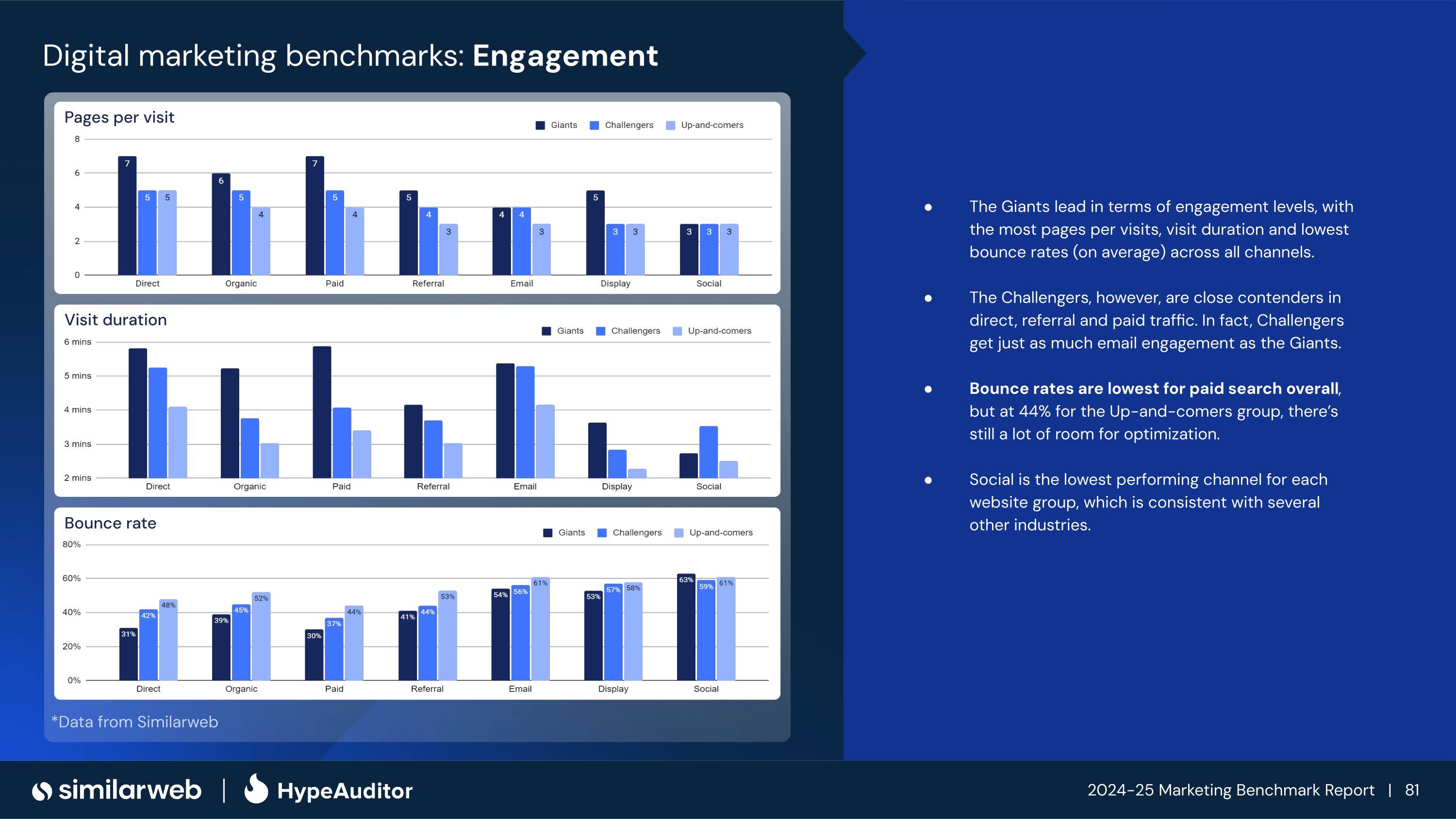
Leading business data company SimilarWeb has released it’s 2024 benchmark report that details traffic data for 6,000 websites from 12 distinct industries. In the report it shows Organic Search being the second highest referring channel outside of Direct traffic. This is a remarkable metric considering that past studies have shown that up to 60% of Direct traffic could be misappropriated Organic traffic.
This report was recently mentioned by well renowned SEO consultant Aleyda Solis on X.
2024 is about to finish, and once again, SEO hasn't died. This is the evolution of Organic Search as a Marketing Channel in the last year across the US, UK and Germany. The only traffic source ahead is "Direct", and way ahead of others ? Remember this whenever negotiating and… pic.twitter.com/unRzY9SIXK
Business leaders that want to take advantage of Organic Search in 2025 need to continue to invest in SEO with strong strategies that emphasize technical infrastructure, content optimization, and media distribution. Doing so will not only ensure their chances for growth, but will also mitigate the risk of being an outlier and falling victim to more volatile ranking changes.
If you’d like to get started now, planning your 2025 strategies for SEO, contact Joe today!
We use cookies to ensure that we give you the best experience on our website. If you continue to use this site we will assume that you are happy with it.