
White Label SEO Audits For Agencies and Consultants in 2025

Would you like to add high quality technical SEO audits preformed by an experienced technical SEO to your agency’s offering? Do you need a reliable SEO to help with overflow? Do you want to knock your consulting services out of the park in the first month of your retainer? If you answered yes to any of the above, then I have some great news for you!

From the last half of 2019 (and now into 2025) I have been working close to a select group of agencies to supplement and enrich their technical SEO services. As a result I have developed a streamlined white label SEO consulting service that can take any agency to the next level.

What you can expect from a white labeled audit:
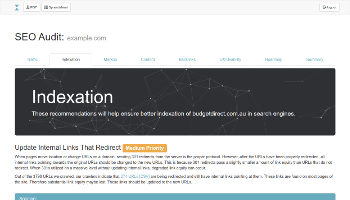
Beautifully designed interactive reports. In 2014 I developed a custom reporting dashboard that has allowed me to write and output my audits in interactive HTML/CSS/JS. The result is easy to read audits and reports that clients love to dive into and learn from. With the ability to embed charts, tables, code samples, and more; these audits are guaranteed to outperform your competitor’s boring Word Documents and PDFs. These types of reports are easy to white label with your agency’s logos, color options, and even branded URLs to share in email. If you’d like to see an example audit, email me now.

Seamless workflow. Along with the interactive reports, each agency also gets a custom reports dashboard. From with in it you’ll have access to: easy report management/status, instant quote calculator, direct communication with me, and new features regularly added. I am also available to work with in your project management system of choice.

Experience driven, not tool focused. There are many automated audit and reporting tools available to white label and resell. While these might be useful to some, they lack a nuanced understanding of the SEO and web development process. I use tools such as ScreamingFrog and SEMRush like many other SEOs. But each one of my audits is based on years of experience, and an attention to detail that an automated tool can’t deliver. Which is why I often tell clients that the most powerful SEO tool I use, is the one found between my ears! (and, now you can use it too!)

In depth analysis. One of my favorite and most used SEO strategies is what I call the kitchen sink strategy. This means we try everything possible to optimize a site for SEO. This also applies to my audit process by analyzing every possible aspect of a client’s SEO infrastructure. Which means that even though I can customize an audit to your client’s needs, the majority of my audits all include the following sections:

  • Traffic and Analytics Analysis
  • Indexation Analysis
  • Markup Analysis
  • Content and Page Analysis
  • External Link Analysis
  • UX/Usability Analysis
  • Strategic Roadmap

Post audit review and support. After the audit or report is delivered to the client I am available to review the audit and answer any questions with the client and the agency account manager free of charge. You can introduce me as a member of your team or as an independent SEO that is helping out.

White Label SEO Audit FAQs

How long does it take to do a white label SEO audit?

Usually no more than 30 days. However, the typical turn around is about 2 weeks.

What do you require to do the white label SEO audit?

Most audits just require access to your client’s Google Analytics and Google Search Console. After the deposit is paid I will send you instructions with the right email to add for each.

Can you implement the recommendations found in the white label SEO audit?

In every audit is a section that indicates which recommendations I can help your agency implement. If you’d like me to leave that section out and use your in house team instead, thats cool too.

Can the white label SEO audit include special areas of interest?

Yes each white label SEO audit can examine targeted areas or problems. Please mention what those areas or special problems are when requisition a quote and I will include it in the pricing.

Can we see an example white label SEO audit?

Sure! Email me, and I will send one.

Do your white label SEO audits come from an automated tool?

No, they do not. I use ScreamingFrog, Semrush, Majestic.com, and several other tools and data providers to collect the required data needed. I use this data to put together a custom audit with the client’s web site in focus. Everything is written for the client specifically, and considers the context of the best strategy for success.

When can you get started?

If this is your first white label SEO audit, we will need to meet to discuss branding, and audit delivery. Then I can send you a proposal. As soon as you approve the proposal I will send you an invoice for a 50% deposit on the project. After the deposit is paid I will send you an ETA for the audit and begin working as soon as possible.

Can you review the completed white label SEO audit with our client?

Yes as soon as the audit is completed I will work with you to schedule a review meeting with you and your client where we will review the entire audit over a screen share. You can introduce me as a member of your team or an outside consultant. A recording of the meeting will be provided afterwards for you and your client to review if needed.

Contact me today about availability, pricing, sample audits, or just to say howdy! I am limited to how many agencies I can work with at once so please don’t hesitate to reach out ASAP.

What is a good CTR for SEO? How to find your CTR baseline.

screen shot of Google docs spreadsheet with clicks, impressions, CTR, and position, for landing pages from search console.
CTR Baseline Worksheet

Organic click through rate has long been the subject of debate among SEOs. Many have suggested that higher organic CTRs can have a positive impact on rankings because they are a clear signal to the search engines of user intent. Despite sending mixed messages in the past, Google, now claims that CTRs do not have any impact on rankings. My personal opinion has evolved over the years, but from a broader perspective: it doesn’t really matter.

It doesn’t really matter if CTR impacts rankings, because SEOs should be optimizing their CTR no matter what. An increased CTR means more traffic from the search engines no matter what the rankings are doing. However one of the issues that I have always come up against, is how do I know if my CTR is good or not? I mean at some point I have to prioritize which pages I focus on, and I don’t want to waste time on pages that have reached their highest potential.

Many SEOs in the past have tried to answer this question by calculating an average CTR. While at the time those types of studies may have been helpful, they are now impacted heavily by things like featured snippets, rich results, and knowledge graph panels.

Therefore instead of using an average based on massive data sets, SEOs should rely more heavily on their own data to develop CTR baselines that they can optimize against. Doing so accounts for the context your site find’s itself in the SERPs. Below is a method that you can use to develop your own CTR baselines. I originally got the idea for this from my buddy Ryan Jones (thanks Ryan!).

How to find your CTR baseline for SEO.

  1. Login to Google Search Console for the site you are analyzing. Go to the Performance Report.
  2. Select “Web” for Search Type and at least 3 months of data. Make sure to select “Average CTR” and “Average Position”. And we are going to want to segment this for “Pages”. So your dashboard should look something like this.
  3. Export the data to your choice of a CSV or Google Sheets.
  4. Open up the exported data and add an additional column next to the Position column.
  5. We need to round the average positions to the nearest whole number to make the data more docile. In Excel we can use the ROUND function which is almost the same in Google Sheets. Round the values in the Position column to the nearest whole number in the column you added in step 4.
  6. Now its time to replace the values in the Position column with the new rounded values you created in step 5. To do this, you need to copy the new rounded numbers and then paste them on top of the values in the Position column. Make sure you are pasting “Values” and not “Functions”. Now your Position column should contain the closest whole numbers of each average position.
  7. Finally we need to create a pivot table using the Position and CTR columns. Highlight both columns and Insert Pivot table. Select Position as the Rows and CTR as the Values. Usually the default formula for values is SUM so you will need change that to AVERAGE.

The resulting pivot table created in step 7 contains the average CTR baselines for each position listed. You can use this data by comparing the CTR seen in Search Console against the same for each position in the pivot table.

For example in the screenshot embedded above we can see our baseline pivot table shaded in blue. The page listed on Row 3 has an average (Rounded) position of 4 and a CTR of 3.81%. If we compare this to our baseline pivot table we can see that the average CTR for position 4 is 10.67%. Which means that the page found in Row 3 is getting a statistically low CTR for its position and needs to be optimized. You can make this type of analysis easier by using some conditional formatting to highlight Rows that fall under the baseline with a different shade background, like I have done in red.

Notable caveats to this analysis…

To preemptively silence the haters and naysayers I should probably offer a few caveats to this analysis.

  • There’s a lot of extrapolation going on here. Because we have rounded the average positions and then averaged the CTRs associated with each, we have casted a larger scope of possibility than might serve useful, especially if you are using a small data set. Be mindful that this type of analysis only works if you have a large enough data set.
  • Percentages of any kind can be misleading. For example a page might get 2 impressions, and 2 clicks with in your data set. Which results in 100% CTR. If enough of those low volume pages all rank in the same position it will seriously throw off your baseline for that position.
  • Even though these baselines are subjective to your own data set, they are still based on the entirety of site’s data. If you want a more segmented granular approach I suggest you take a look at a similar analysis that uses the R programming language to segment this type of data further than just ranking position.

I really don’t want to write this paragraph, because I feel like there’s not really anything left to say here. But not adding a conclusion paragraph sort of feels like going to work in the morning without any shoes on. So anyways, now you are well equipped to discover your own CTR baseline using the method outlined above. You can run this analysis, optimize against it, and do the whole process again after a few months, to continuously optimize CTR on an ongoing basis. Good luck!

I now work at PerficientDigital.com as a Senior Organic Search Strategist.

Side note from Joe: This post is out of date. I no longer work at Perficient. I wish them the best of luck though. Please take a look at the rest of the site if you are in need of a SEO audit or consulting.

As of 6/25/2018 I am now a Senior Organic Search Strategist at PerficientDigital.com!! I will still be providing world class SEO consulting and insights to mid-level and enterprise brands, but now with in Perficient’s family of global technology services. What this means is clients can expect the same level of insights and dedication along side an amazing team of SEOs such as Matt Ruud, Renee Girard, Ben Cook, Phil Haas, and Bobby Gonzalez just to name a few.


Anyone that has ever owned their own business will tell you that a majority of your time is spent doing the things that have nothing to do with the work you charge for. This is simply because when you are a solo entrepreneur you are forced to wear every hat that’s required to run a business. This includes, marketing, sales, book keeping, sub contractor management, account management, tech support, reporting, and a million other things that don’t include the one thing you thought you’d be doing when you started your business. And quite honestly I am tired of wearing a million hats and only getting paid for one. Also, I have struggled to grow the business’ revenue while still maintaining the quality of work that I am comfortable with. Its hard to scale consulting with out literally cloning yourself. 😛

But beside the struggles of running and scaling a small consulting business, I am also faced with uncertainty about the future. Entrepreneurs with disabilities face many challenges that others don’t. One of which is securing access to affordable healthcare. And as I grow older affordable healthcare is becoming more and more important in my life. Unfortunately, it looks like for me access to healthcare is again on dubious grounds. However, Perficient has been able to provide me with an excellent benefits package that gives me the peace of mind and stability to continue my career.

Perficient has also generously allowed me to pursue non-competing side projects if I’d like. Which means I am able to start another business on the side if I want. This will allow me an exciting opportunity to build something non-SEO related that will help me pursue my creative side, like so many “born to be entrepreneurs”. 🙂 So stay tuned for exciting things, because after 11 years in SEO, with Perficient Digital at my side, I feel like I am just getting started again! 🙂

TF-IDF Will Not Help Your SEO

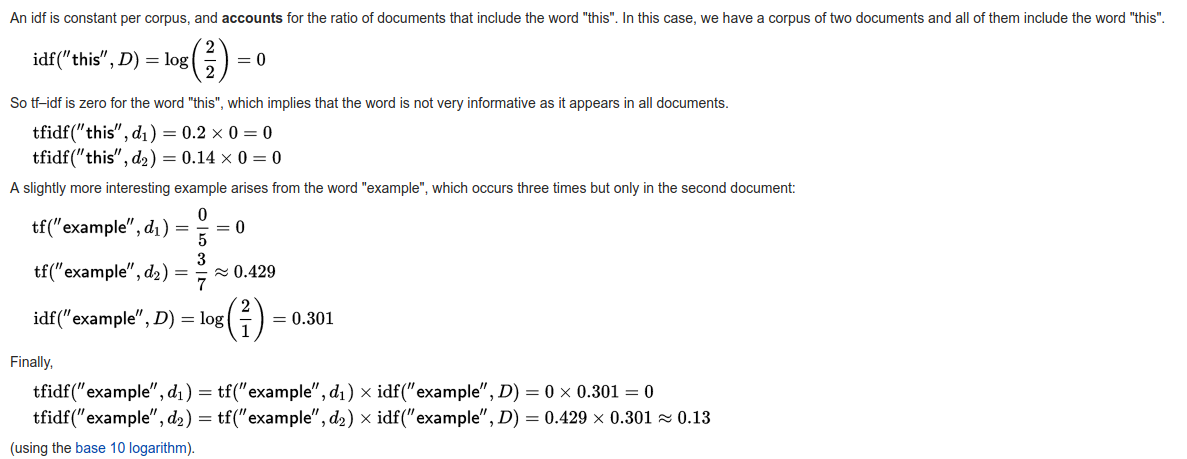
TF-IDF algorithm from Wikipedia
Screenshot from WikiPedia Article

For those that aren’t familiar TF-IDF is a basic natural language processing metric used to ascertain the natural relevancy of a term within a document. The process is simple and works by counting the frequency of a term for a given piece of content, and multiplying it against the frequency of the same term within a large corpus of documents. In some cases the two maybe weighted with a multiplier or other metric to account for other variables within the corpus or the document itself. But largely this metric is just a basic understanding of where a specific document falls on a “scale of normalcy” for a target term, within a large corpus of documents. I assume (no one really knows) that if Google uses this type of metric, they likely do so to develop a baseline for things like spam or over optimization.

Several years ago I had a plan for a new SEO tool that relied heavily on correlation data, similar to what Moz and others provide. One of the metrics that I wanted to get correlation data on was TF-IDF.

I ended up not including TF-IDF as a metric within my tool set because I felt that it was impossible at the time for me to calculate such a metric without access to a massive corpus of documents like Google or other search engines, utilize. In fact I remember having a very brief conversation with Matthew Peters at Moz about how they calculate their TF-IDF for the correlation studies, and he mentioned that they pull from within one of Moz’s crawlers to pull from at the time 25 million URLs. He also recommended that I consider using Wikipedia which is easy to download and extract data from. Wikipedia would have been a good choice however the style and type of language used on Wikipedia often times doesn’t represent normalcy across the rest of the internet.

I came away from that experience understanding that if you want to use TF-IDF in a meaningful way that relates to SEO, you need a corpus of documents as close to the size of Google’s index as possible. Otherwise it seems as if your metric will be way off or have deeply inherent biases.  Unfortunately I ended up not developing the tool at that time and putting it on the back burner for other projects that were more pressing.

However, the issue of TF-IDF came back up later, when OnPage.org launched, (which has since rebranded to ryte.com). At the time I heard the claims that TF-IDF was some sort of magic metric that could be used to optimize content perfectly. I was suspicious when I heard the claims especially since they kept referring to “homonyms” which have nothing to do with TF-IDF.

Then a few months later I went to MozCon, and had some very nerdy conversations with some very smart folks that claimed what I thought about TF-IDF was wrong and I really needed to look at OnPage.org. So, when I had time, I signed up for their free account, and gave it a shot, and recently another smart SEO, Nick Eubanks, has released an almost identical tool that makes many of the same magic claims.

Do these tools help SEOs and content developers optimize content? Yes! But, it has very little to do with TF-IDF. A major problem with these tools approach is the extremely bias dataset they rely on. Both tools only look at around 10 or 20 documents as their “corpus”. This alone means that they aren’t getting an accurate metric as it applies to SEO, where a search engine will likely pull from billions if not trillions of pages in its index. Another problem is that the 10 or 20 documents are taken from the top results. It’s likely that other ranking factors such as backlinks have a lot more significance than any basic NLP metric with in the first 20 results.

Which is why the brilliant Cyrus Shepard stated in 2014 “In other words, generating a high TF-IDF score by itself generally isn’t enough to expect much of an SEO boost.”

This misunderstanding tends to contribute to an overwhelming prevalence of confirmation bias found in many inexperienced SEO analysts. These types of tools can help optimize content for SEO, but not because of TF-IDF. Simply because they provide guidance and encouragement to rewrite content with more natural language that is commonly used. These same tools can be made using other metrics like “keyword density” or just “total term counts”, that can be compared against each other.

In my opinion the best (and only) secret weapon to optimizing content for SEO, is learning how to write well and quit chasing the algorithms. If you are not building a search engine then focusing on TF-IDF is likely a waste of time. However, if these types of tools help you create better content, then don’t let me get in your way. There are always  plenty of different ways to rank web pages.

Changing Content Dates Could Hurt You, Says Google’s Gary Illyes

Articles that have more recent dates listed next to their Google search result snippets may benefit from a higher click-through rate. However, even if an article clearly has a click-through rate, Google may not show the date.

As content creators worry that their evergreen content could be overlooked due to an older publish date, they have resorted to continuously updating or manipulating their publish date to make the content seem “fresh.”

While this is a common practice for some, there could be consequences. The main concern centers around the triggering of a spam filter for changing the dates or Google completely removing dates from the site.

Gary Illyes, Google Webmaster, shared his insight this month at the State of Search conference in Dallas. According to Illyes, he hints that this date changing practice will have a negative impact, as Google will no longer believe your dates.

He went on to explain that when news content is searched for, the published date can be extremely helpful in determining the relevance of the article. So if Google detects that you are changing your dates, they may remove all published dates, making it difficult for someone to understand the relevance of your content.

While Illyes does caution against this practice, he does mention that changing the date a few times won’t impact your site. However, if a publisher is doing this widely across their site, it’s likely they will experience the consequences. At the very minimum, Google is considering something to punish those who behave in this way.

If a publisher is wanting to follow best practices, Illyes recommends instituting a time stamp system so a publisher can clearly show when new or updated information has been added to the post.

He also recommends considering if publish dates are important for the type of content. An article covering marketing trends in a specified timeframe might require a date but an article on marketing trends over time may not.

This advice also came with his statement that removing low-quality pages on your site won’t necessarily boost your website’s visibility.

If you’re wondering how this might affect your website’s content, reach out to Hall Analysis for information on how to combat this issue.